CMSC724: Architecture of a Traditional Database System
Instructor: Amol Deshpande
This chapter follows “Architecture of a Database System” by Joe Hellerstein, Mike Stonebraker, and James Hamilton (Foundations and Trends, 2007) — the main reading for this module. It is worth reading in full, in stages if you prefer.
The paper is old enough to be dated in places, and we will flag where. But it does something no textbook does, and that is why it is on the reading list.
Passages marked as editorial extensions were written by the notes generator and go beyond the source slides and class discussion.
1. Why Read This Paper
Here is a question I had for a long time, and which no undergraduate course answered.
The correctness guarantees of transactions require that the database system control when things are written from memory to disk. It needs fine-grained control over what is in memory and what is on disk — in both directions. It needs to control when a page is written out, and, just as importantly, it needs to control when a page is not written out, because it is not ready.
But a program running on top of an operating system does not have that control. The operating system can take a page that is in memory and write it to disk at any point. There is no system call to stop that from happening.
So how do database systems do it?
Doesn’t logging solve this? No. Logging helps you recover from failures, but it does not solve this problem, and in fact it has the same problem itself.
Log records are written in memory first, and one of the requirements of write-ahead logging is that log records reach disk in order. You cannot have them written out of order. If log page 2 reaches disk before log page 1, and you crash immediately after, you now have 2 on disk without 1 — and that is a problem you may not be able to recover from.
So even with logging, you still need control over what gets written out and when.
The short answer is that the database system cannot. PostgreSQL running on your laptop does not actually have this control, which means PostgreSQL running on your laptop cannot genuinely guarantee the ACID properties. In practice your laptop is not going to crash, and you are not running critical transactions on it, so it is less of an issue. But a database system running on top of a general-purpose operating system has no easy way to solve this. It may be able to tell the operating system not to write a page out — and the operating system may or may not respect that, because it has its own optimization goals and its own policies.
There are several questions like this. You can understand your undergraduate textbook well and still not know the answer, because the textbook is describing what a transaction is rather than how one gets implemented on real hardware under a real operating system. This paper answers them.
On the paper’s age. It was published in 2007, and in terms of where the industry has gone in the intervening years there has been a complete shift. PostgreSQL — a system built largely before 2007 — still matches this description well. Newer systems often do not, because they are built differently now; there is far too much variation.
I was trying to think about whether someone could write a paper like this today, and I do not think it is possible. When Joe wrote this, databases all followed more or less the same pattern. That is simply not true anymore. If you look at the biggest database systems today, they are built very differently from one another.
Read it anyway. Even though it is dated, many of the things it discusses are still valid, and it forms the basis on which the rest of the semester builds.
2. The Five Components
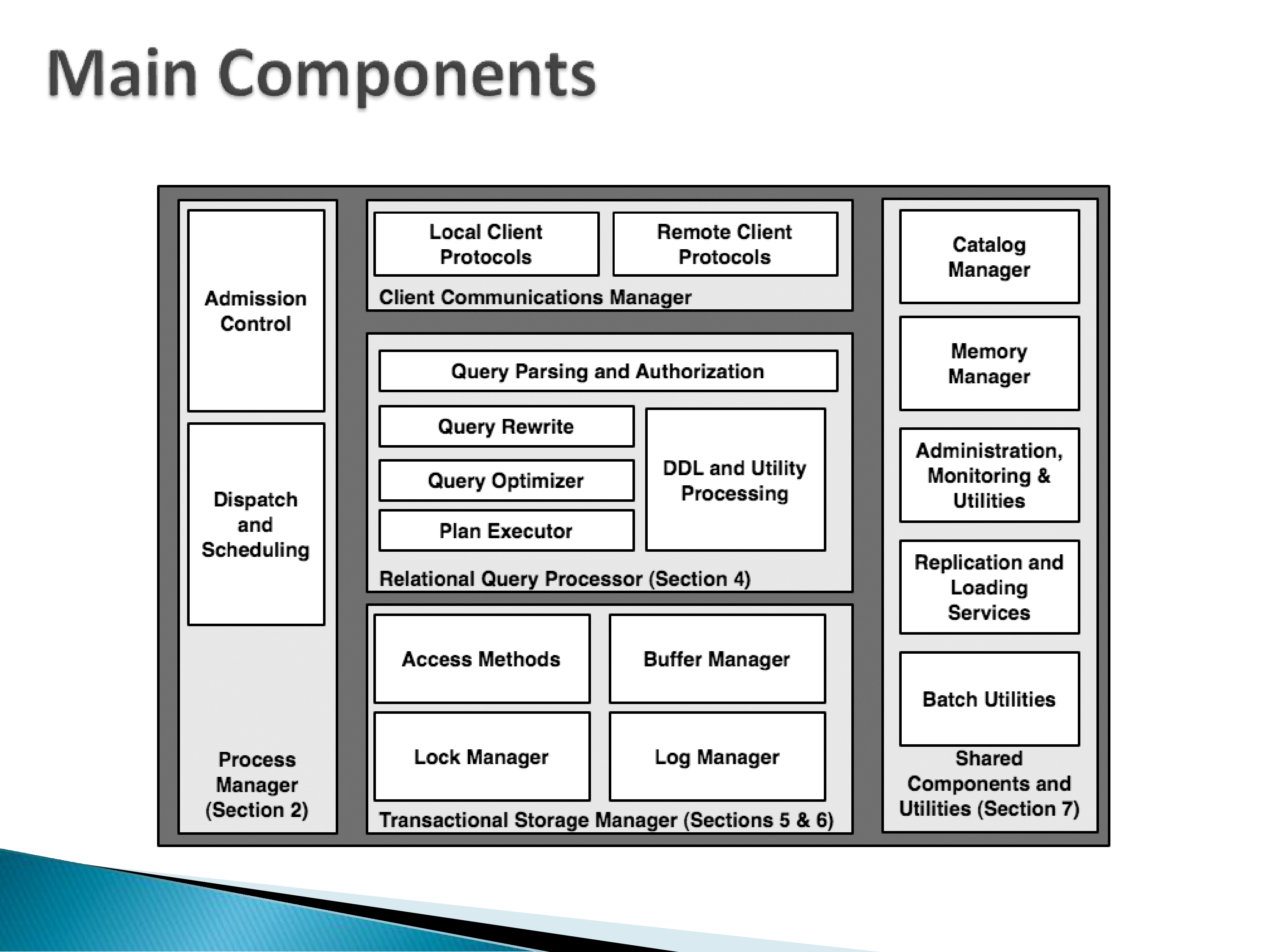
According to the paper, a traditional database system looks like this. Components may be named differently in different systems, but by and large they take this shape. Roughly, five groups:
- Client communications manager, which talks to clients.
- Process manager, which decides who does the work.
- Relational query processor, the entire query path.
- Transactional storage manager, dealing with storage, locking, and logging.
- Shared components and utilities — the assorted things a database system needs in order to actually work.
We will go through these in turn. But first it helps to trace a query end to end.
3. The Life of a Query
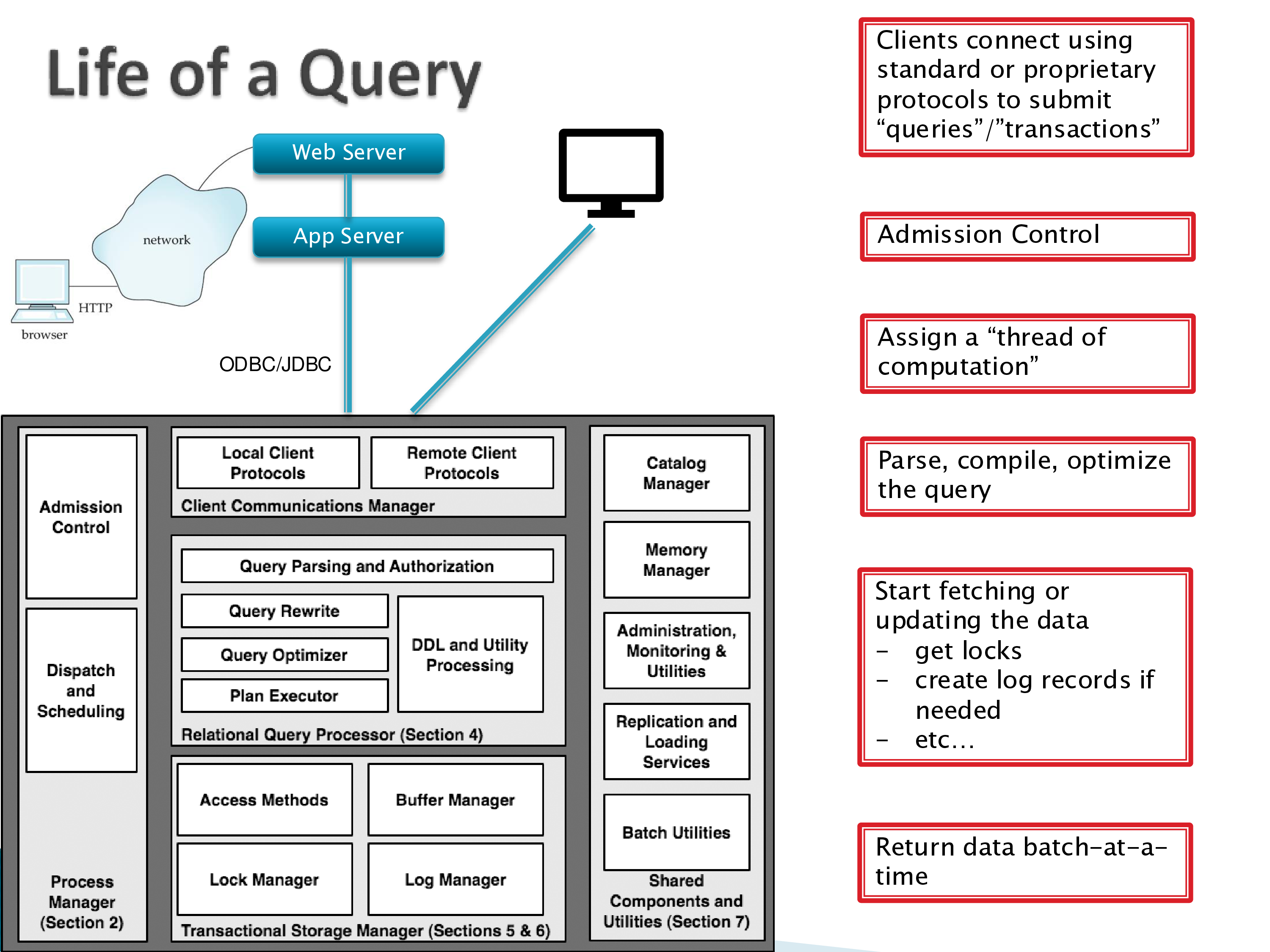
Suppose you are shopping on Amazon. What actually happens?
The client is almost never a person
There is a user sitting at a browser, but the database’s client is not that person. Between them:
- A web server, whose job is simply to handle the back-and-forth with browsers — or with mobile apps, which today mostly use the same architecture.
- An application server, which holds much of the business logic: what happens when you click here, where you go next. These layers are up to whoever develops the application, but an app server almost always exists.
The app server talks to the database using some protocol. This architecture is very typical, and it does not much matter which database sits underneath — the rest of it is fairly standardized.
Is the database only connected to the app server? More or less. In principle the app server puts a layer around the database and nobody talks to the database directly.
That is not how it usually works, though. Developers have direct access. And if you are running business analytics — Power BI, Tableau — you would want that talking to the database directly. Multiple things having direct access introduces its own issues, but those issues do not go away by putting an app server on top; they just move.
The protocols
Traditional client communication protocols are ODBC (Open Database Connectivity, developed primarily for C and C++) and JDBC (for Java).
Note that the protocols you are probably more familiar with — REST and friends — are not part of this. REST sits on top of the app server. App-server-to-database communication in traditional systems does not happen over REST. Some modern databases do support REST, but usually through a layer above.
Are these protocols stateless? ODBC and JDBC are not: you connect, and you keep that connection open. REST, running over HTTP, is stateless. The distinction matters for everything that follows, because a stateful connection means the server has to hold state on your behalf.
The server itself is emphatically not stateless. It has the entire database on it and is keeping track of a great many things.
Where do other protocols fit? GraphQL typically sits at the web-server or app-server layer. And when you connect to PostgreSQL from Python using psycopg, that library does not use ODBC or JDBC — it speaks PostgreSQL’s own specialized wire protocol. Database systems support their own protocols because they are more efficient.
You can always add layers on top that translate, and immature systems often do. But for efficiency, the further down you push it and the fewer layers you have, the better.
Admission control
As soon as clients start connecting, you have to worry about admission control, because databases genuinely do run into problems with too many clients.
Admission control means making sure you have the capacity to do the work, and in practice it means rejecting connections at some point — replying “too busy” and refusing to accept more. Not much more than that.
In a modern web application setup, you might place admission control at the app server or even at the web server instead. So the database’s own admission control still exists as a component but may never come into play.
Assigning a thread of computation
Once a connection is established — and remember these are stateful connections — something has to run to service it. Either you assign a process per connection, or you create a thread within a single process. This choice turns out to be one of the more consequential in the whole design, and it gets its own section below.
Executing, and returning results
The query has arrived, passed admission control, and been assigned a thread of computation. Now it is parsed, compiled, and optimized. Then execution begins: the executor goes to the storage layer, which goes to the disk. Depending on whether this is a query or a transaction, log records may be generated, bringing in the log manager. The lock manager ensures concurrent queries and transactions do not interfere.
Then you have to send the results back, and there is a genuinely interesting issue here that research papers almost never discuss.
JDBC is an on-demand protocol. If your query returns 100 tuples, the server cannot simply send them — JDBC requires the client to ask. So the database system has to support on-demand fetching.
There are two ways to implement it. Some JDBC implementations fetch the entire result and then iterate on the client side. But there are real benefits to iterating on the server side: return the first few results, and when the client asks, return the next few.
That is harder to support, because it increases the state the server must hold. Suppose the query returns a million tuples and the client is not ready for them. Either the server keeps them, or — if it is smart — it does not generate them yet and waits. But waiting adds latency, because when the client does ask, more work has to happen before anything comes back. There is no clean answer.
When does the server throw the data away? When the connection closes. As far as I know the protocol itself does not impose a timeout, though individual JDBC implementations might.
4. Process Models
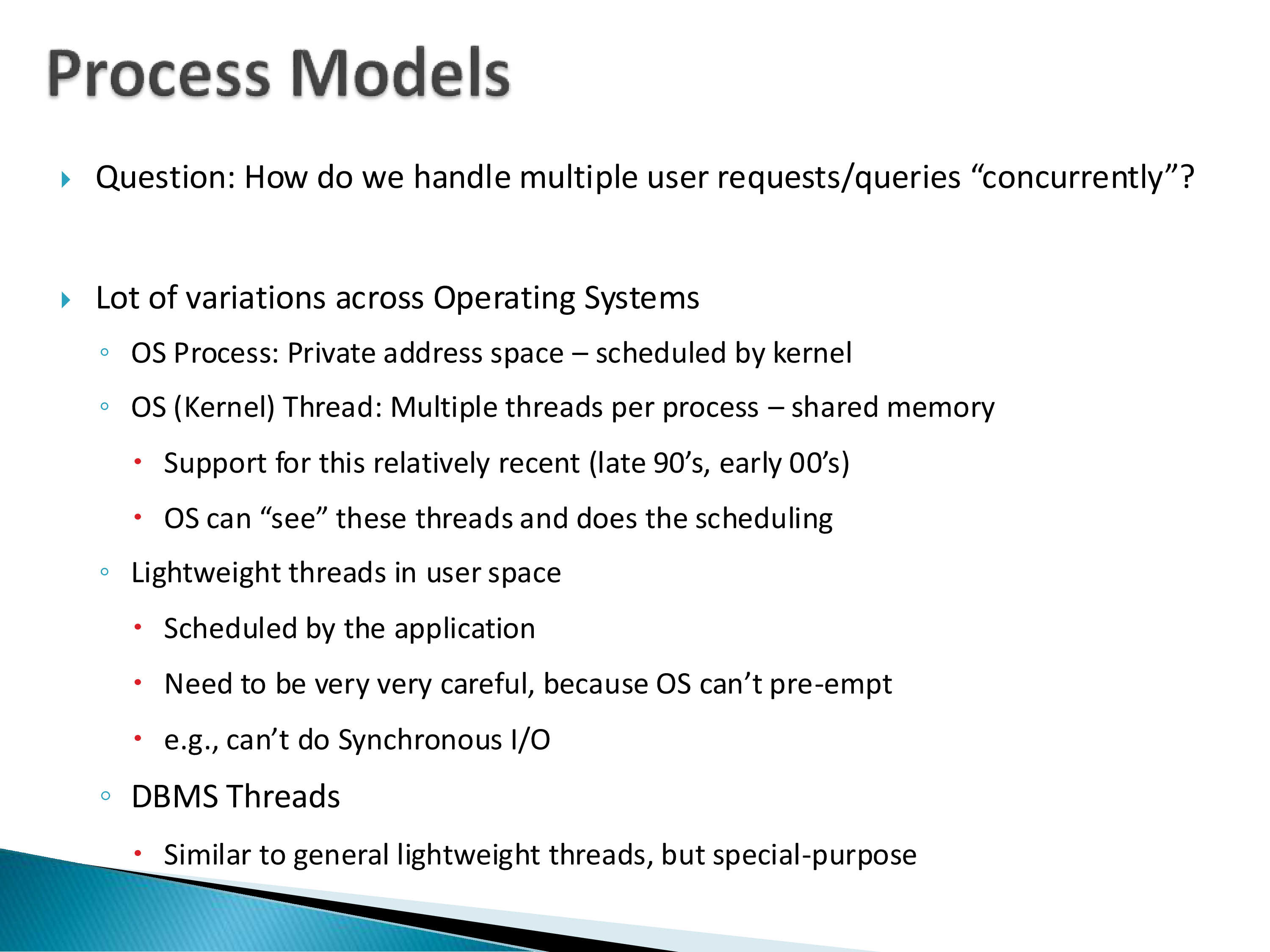
The question the paper is really asking: how do we handle multiple user requests concurrently? There is a lot of variation across operating systems.
- OS process — private address space, scheduled by the kernel.
- OS (kernel) thread — multiple threads per process, shared memory. Support for this is relatively recent (late 1990s, early 2000s). The OS can see these threads and schedules them.
- Lightweight threads in user space — scheduled by the application itself. You have to be extremely careful, because the OS cannot preempt them; you cannot do synchronous I/O.
- DBMS threads — like general lightweight threads, but special-purpose.
Process per connection versus thread per connection
This is worth working through properly, because the tradeoffs explain why the systems you use are built the way they are.
Processes are expensive. They are an operating system construct, and in Unix-like systems they are heavy. Each needs its own virtual memory, which is not cheap to support. And because processes must not interfere with each other, a context switch between processes is expensive — you have to flush the registers and everything close to the CPU, because you cannot allow contamination between processes. This has not fundamentally changed, because operating systems have not fundamentally changed in twenty years.
The number of processes is much more limited than the number of threads. Modern operating systems can handle hundreds of processes, but there are limits beyond that, depending on hardware. (At one point in the 1990s you could bring down a Linux system just by putting a fork in a loop — within seconds the machine would be down, because there was no control over how many processes you could create.)
Sharing memory across processes is hard, and database workers genuinely need to share data structures — not all memory, but the lock table, the buffer pool, and so on. Sharing memory across threads is trivial by comparison.
But threads have their own problem, and it is subtle. Historically threads were not an OS construct; they were handled inside a process by a library. That makes them much cheaper — but because the operating system cannot see them, switching between them is done by that same library, which does not have the OS’s powers. In particular, threads cannot be preempted. If a thread is running, you cannot stop it; it has to give up control.
This matters enormously. If you have a bug, or you hit a deadlock, there is no way to fix it. A deadlock between processes can be resolved by the operating system. A deadlock between threads is difficult to resolve unless the OS can see the threads.
And the flip side of easy sharing: threads can see each other’s memory, so bugs in a multi-threaded server can be very painful and can leak data between clients that should not see each other’s data.
This history explains a design decision you will meet constantly.
Twenty-five years ago, when many of these systems were built or already mature, threading libraries barely existed. In the late 1990s they were just beginning to appear and were not at all mature. PostgreSQL and most of its contemporaries predate 2000.
So many of them ended up with a process model simply because threads were not an option. PostgreSQL uses process-per-connection; its process model is central to its design and not easy to change. Newer database systems definitely use threads.
The three models in the paper
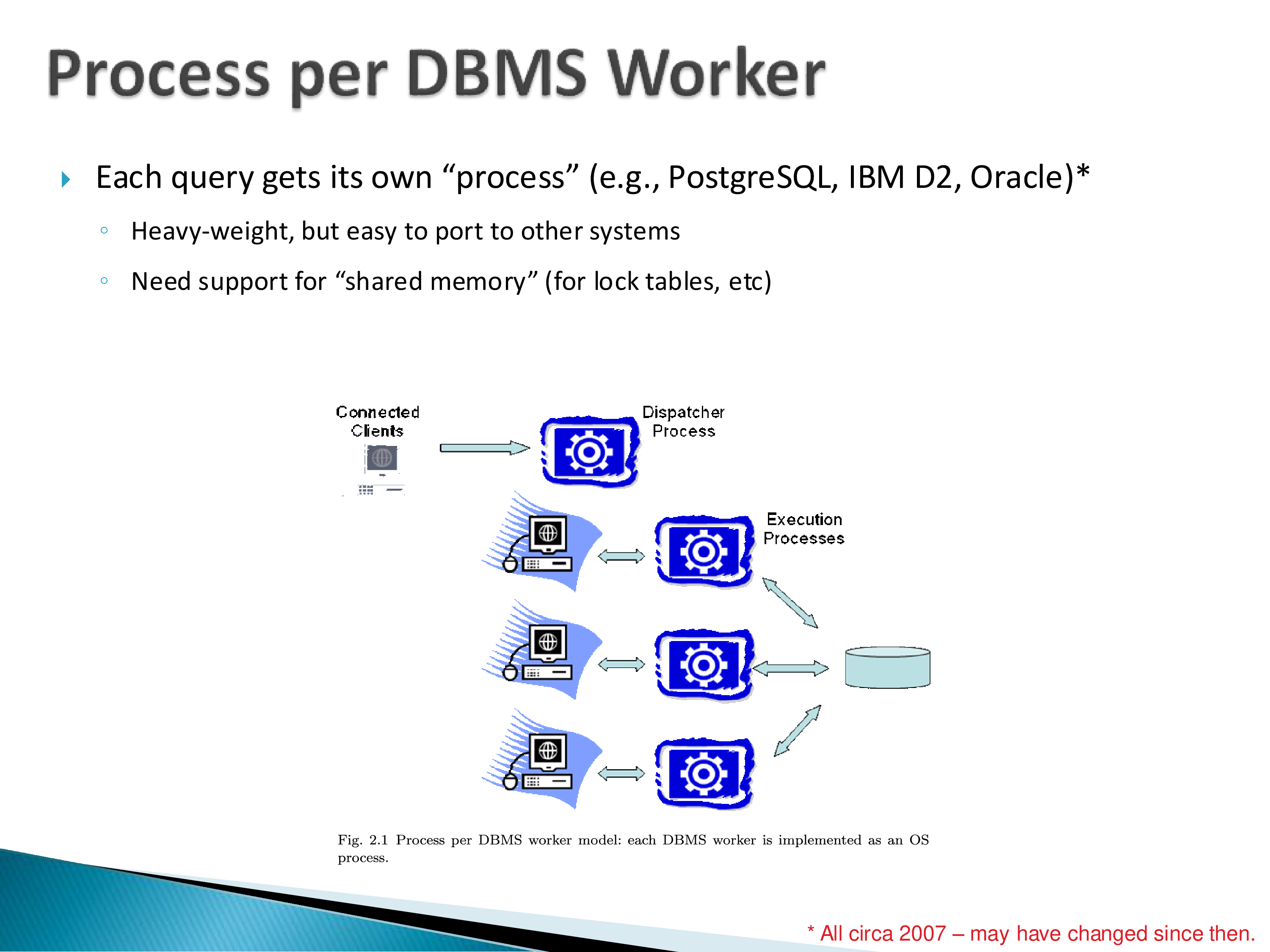
Process per DBMS worker. Each query gets its own process. As of 2007 this described PostgreSQL, IBM DB2, and Oracle. Heavyweight, but easy to port to other systems, and it needs shared-memory support for the lock table and similar structures. The picture is clients, a dispatcher process, and execution processes that share memory to get certain things done.
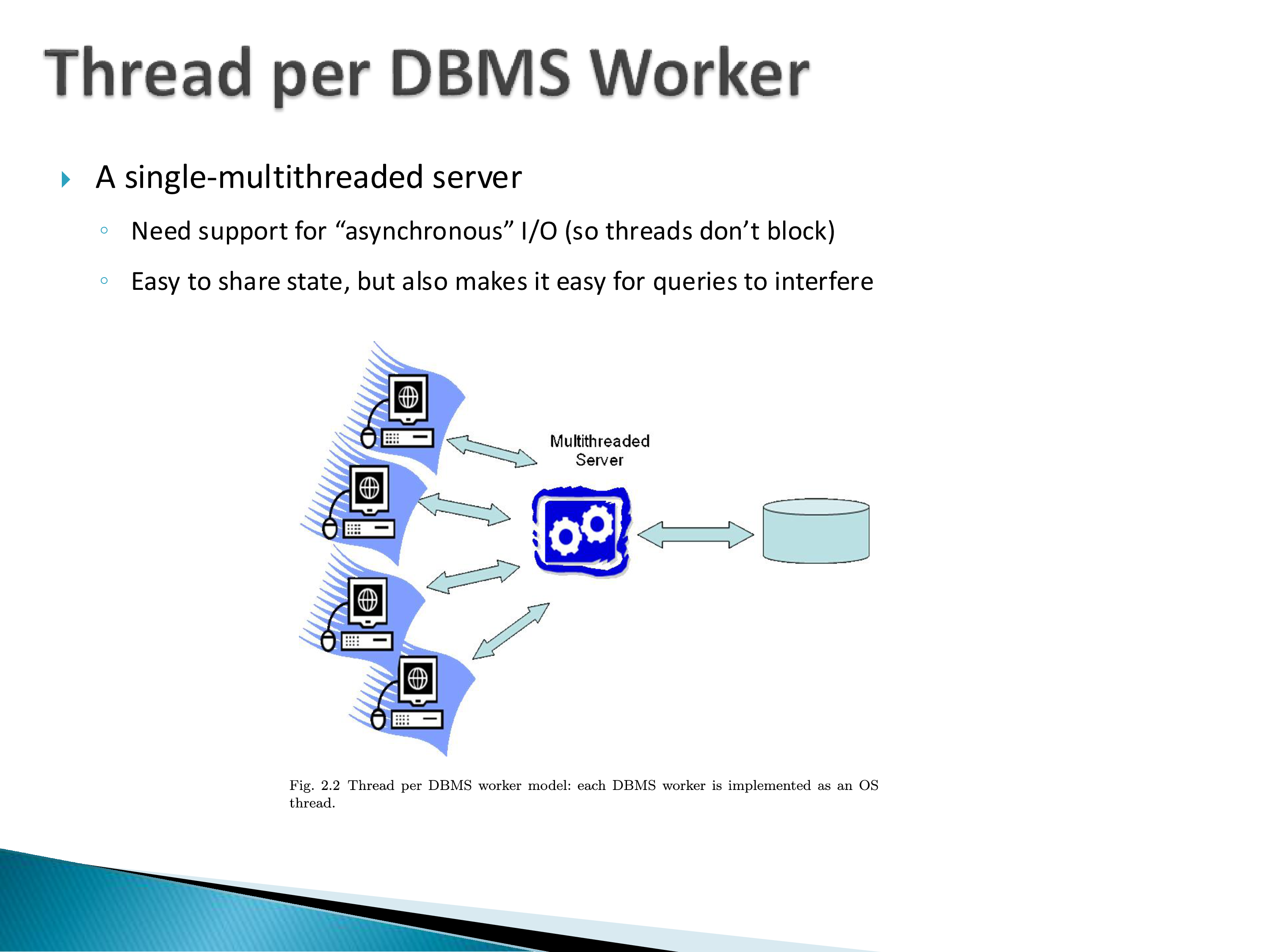
Thread per DBMS worker — a single multi-threaded server. This needs asynchronous I/O support, both network and disk, so that threads do not block. State is easy to share, which is the benefit and also the hazard: it is equally easy for queries to interfere with each other.
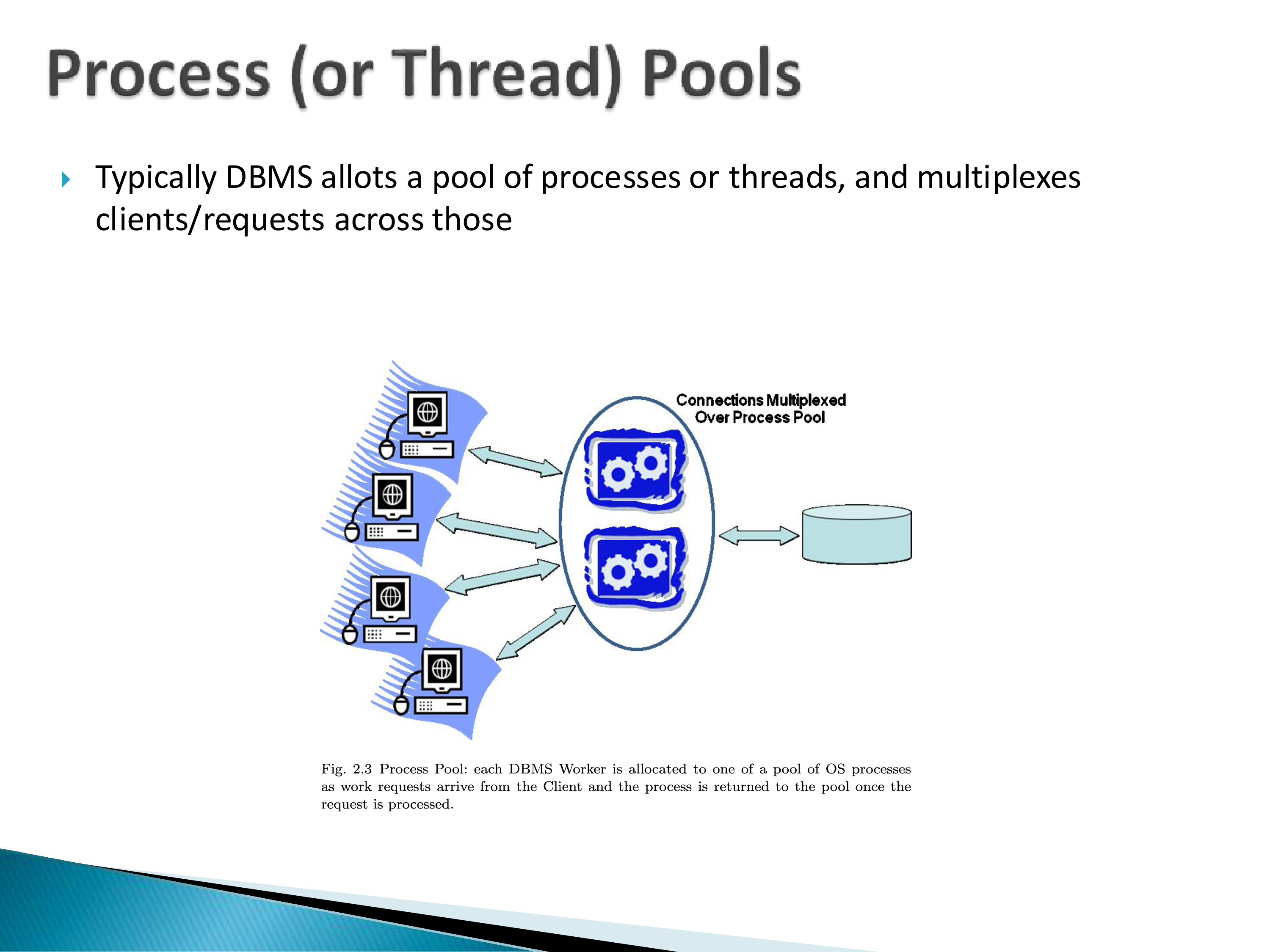
Process and thread pools. In practice a DBMS allocates a pool of processes or threads and multiplexes clients across them. Creating processes is not cheap, so you create them once and reuse them. This is also where admission control naturally lives.
5. Shared Data Structures
Whichever process model you choose, some structures must be shared across workers.
Buffer pool. The chunk of memory allocated for use by the database system, holding the disk blocks currently in use by the different workers, managed with a replacement policy such as least-recently-used. Effectively a cache.
Log tail. All updates generate log records, which must be properly numbered and flushed to disk. Note that there is one log for the entire database system, not one per process — so records arrive from many workers and must be written out in order. For a process model this means the log lives in shared memory. And it is a contention point: with many concurrent transactions all wanting to append records, you need synchronization.
Lock table. For synchronization across workers when transactions conflict.
Client communication buffers. To track what has already been sent back to each client and to buffer further output — which connects directly to the on-demand fetching problem above.
Latches versus locks
Consider the log. Each record needs a number, so two things must happen without a race: getting the next number, and writing the record. How do you avoid the race condition?
The answer is a mutex — mutual exclusion — or synchronized in Java, or the equivalent primitive that exists in essentially every language today.
In database language, these are called latches, and the distinction from locks is one worth getting right, because both words are used constantly and they mean different things.
| Latch | Lock | |
|---|---|---|
| Nature | Low-level synchronization primitive | Logical construct |
| Provided by | Hardware + OS + language runtime | The database system itself |
| Taken on | Internal data structures | Relations, tuples, objects |
| Duration | Short-term | Duration of a transaction |
| Cost | Cheap | Heavyweight |
| Tracked where | Implicit | Explicit lock table |
A lock is logical in the way that collaborating with someone is logical: for now, I will work on this. The database maintains an explicit lock table recording which transaction is working on which object, so that two transactions do not work on the same object simultaneously.
What does the hardware have to provide? Compare-and-swap. The CPU must supply an atomic instruction of this kind before you can build synchronization primitives on top; early CPUs did not, and without it you cannot construct a mutex.
So latches come from hardware plus the operating system; locks come from the database system.
The sharpest way to see the difference is what a deadlock means in each case.
A deadlock involving locks is routine. Database systems expect them, detect them, and resolve them — that is part of the job.
A deadlock involving latches halts the database system. It is a bug. Somebody has to come and manually kill the process and restart everything, or work out what happened.
6. Parallel Architectures
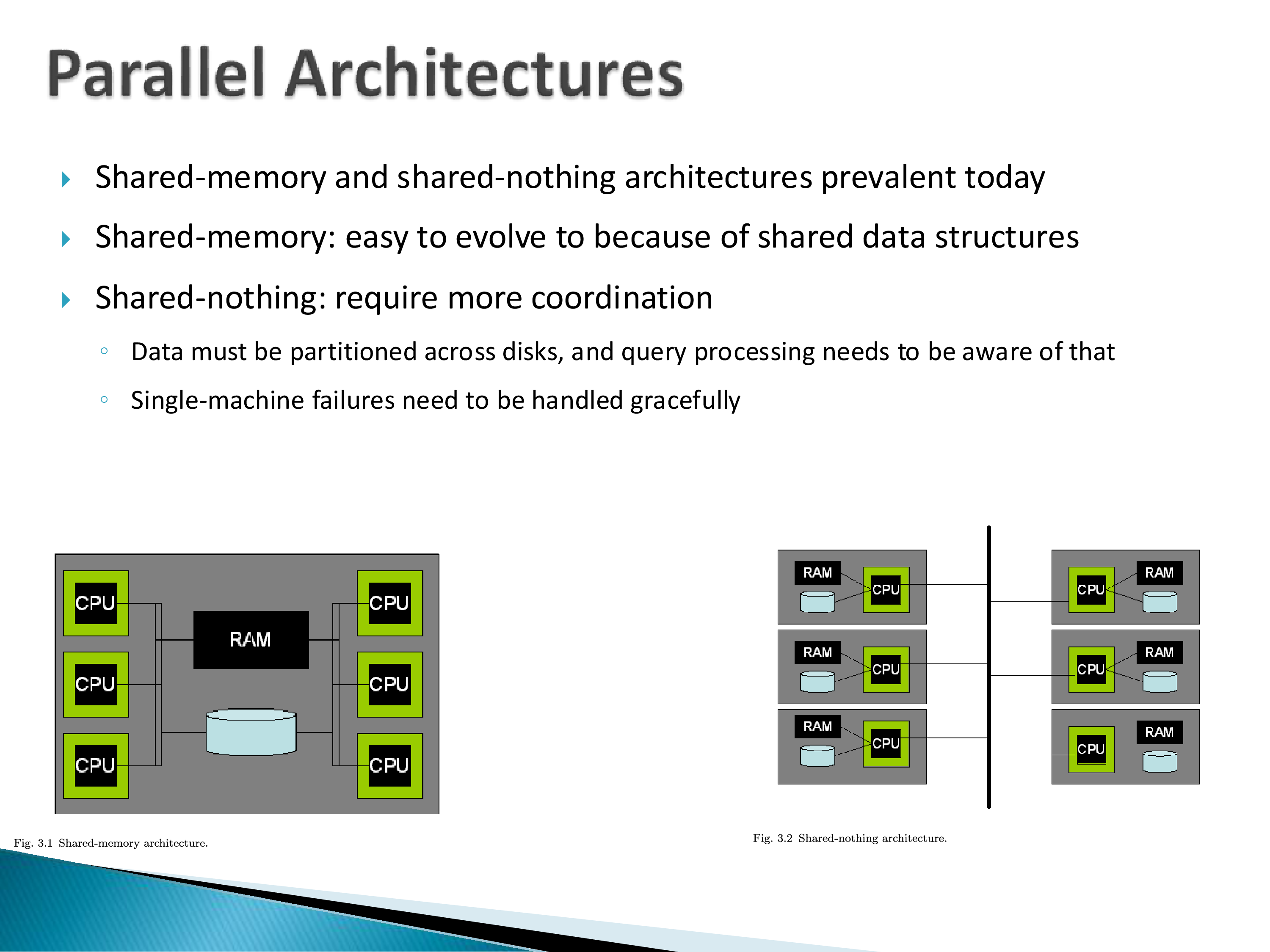
Shared memory means many processors, CPUs, or cores sharing both RAM and disk. Shared nothing means each CPU has its own RAM and its own disk.
Both are prevalent today. Shared memory is easy to evolve to, because the shared data structures already exist — for a database system it does not make a huge difference whether its processes run on one CPU or several that share RAM. PostgreSQL can simply run on a shared-memory machine. It may not make the best use of it, but it runs.
Shared nothing requires much more coordination. Data must be partitioned across disks, query processing must be aware of that partitioning, and single-machine failures must be handled gracefully. Running PostgreSQL on a shared-nothing system requires a great deal of work — the kind you do not want to do yourself.
Modern data centers are shared-nothing, by and large. Note that modern CPUs are themselves multi-core, so a data center is really a shared-nothing architecture composed of shared-memory nodes; we do not usually make that distinction.
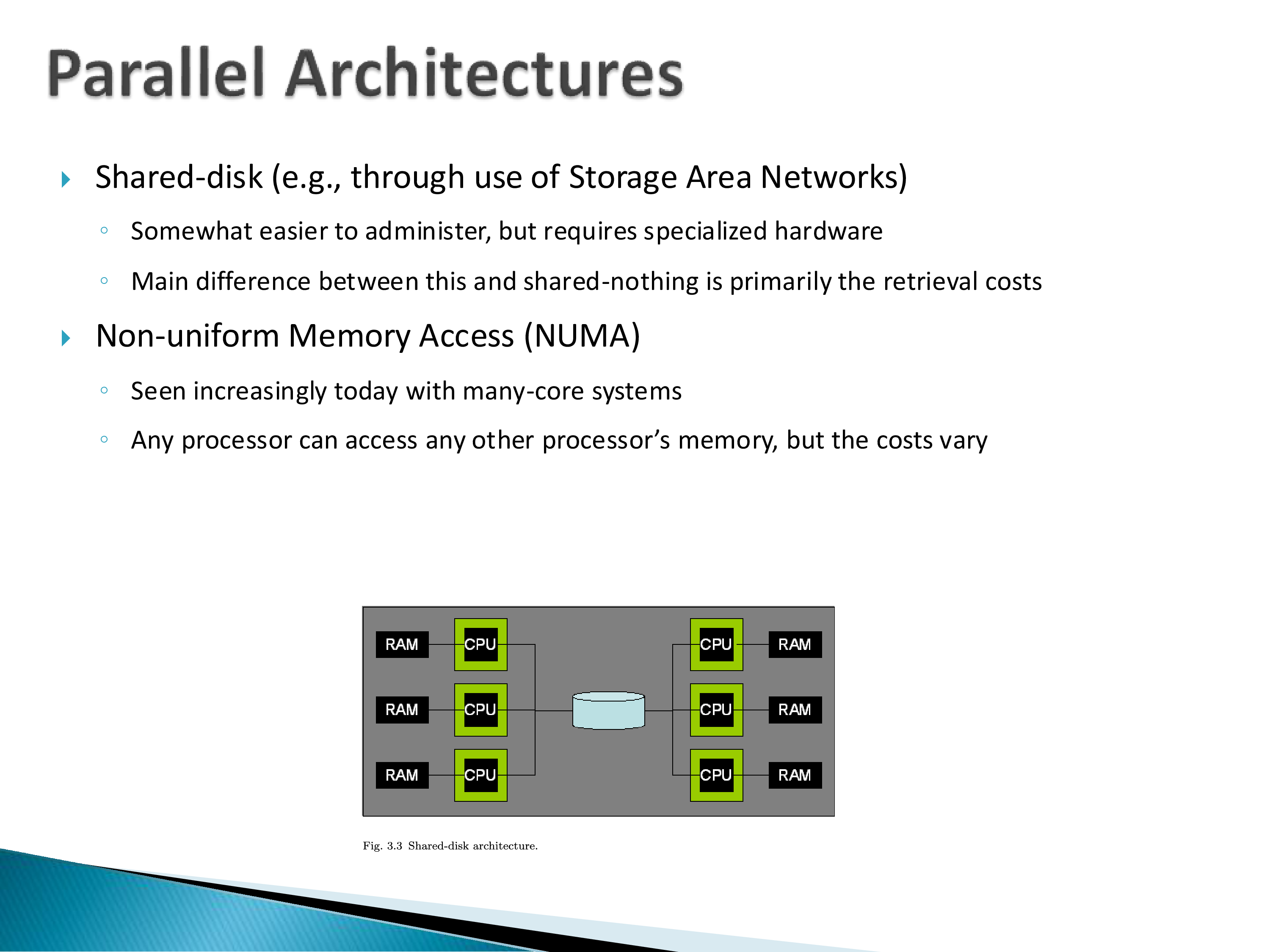
Shared disk — for example via a storage area network — gives each machine its own RAM but shared storage. Somewhat easier to administer, but it requires specialized hardware, and the main difference from shared-nothing is really the retrieval costs. I tend to avoid dwelling on shared-disk because the definition is vague and different people use it differently.
Non-uniform memory access (NUMA) is increasingly common with many-core systems: any processor can access any other processor’s memory, but the costs vary. It has a non-trivial impact on performance and is hard to model, because there is no standard architecture — it depends heavily on how the memory and processor system is built. You will see references to NUMA in papers and occasionally papers focused on it, but it stays somewhat on the side, precisely because results depend so much on the specific machine.
In shared-nothing, can a CPU access another CPU’s memory?
This is where you start asking where to stop. There is RDMA — Remote Direct Memory Access — which over the last decade or so has allowed a CPU to directly access another machine’s RAM, bypassing the remote CPU.
And here is the fact worth remembering: networks inside a well-architected data center are now fast enough that reaching another machine’s memory can be cheaper than reaching your own disk.
RDMA is not the same as NUMA, though. With NUMA the operating system sees the physical memory and has direct knowledge of and access to it — it is as if you have one large memory space. RDMA has restrictions layered on top: you specify a memory address and retrieve what is there, but you do not have direct access in the same sense, and updating is not easy. RDMA is also relatively expensive compared to NUMA, and there are several variants.
The system taken to its logical conclusion here is RAMCloud (Ousterhout et al., Stanford), which treats the aggregate memory of an entire data center as a single low-latency addressable store and demonstrates that this is feasible. The modern descendant of the idea is the work on memory disaggregation — building racks where compute and memory are separate pools connected by a fast fabric.
The reason it matters for this course is the inversion it implies. Essentially every algorithm in the pre-2000 database literature is organized around the assumption that local disk is the far tier. If remote memory is cheaper than local disk, the storage hierarchy has a new level inserted in the middle, and the algorithms that were shaped around the old one are solving a problem that no longer has the same shape.
7. The Relational Query Processor
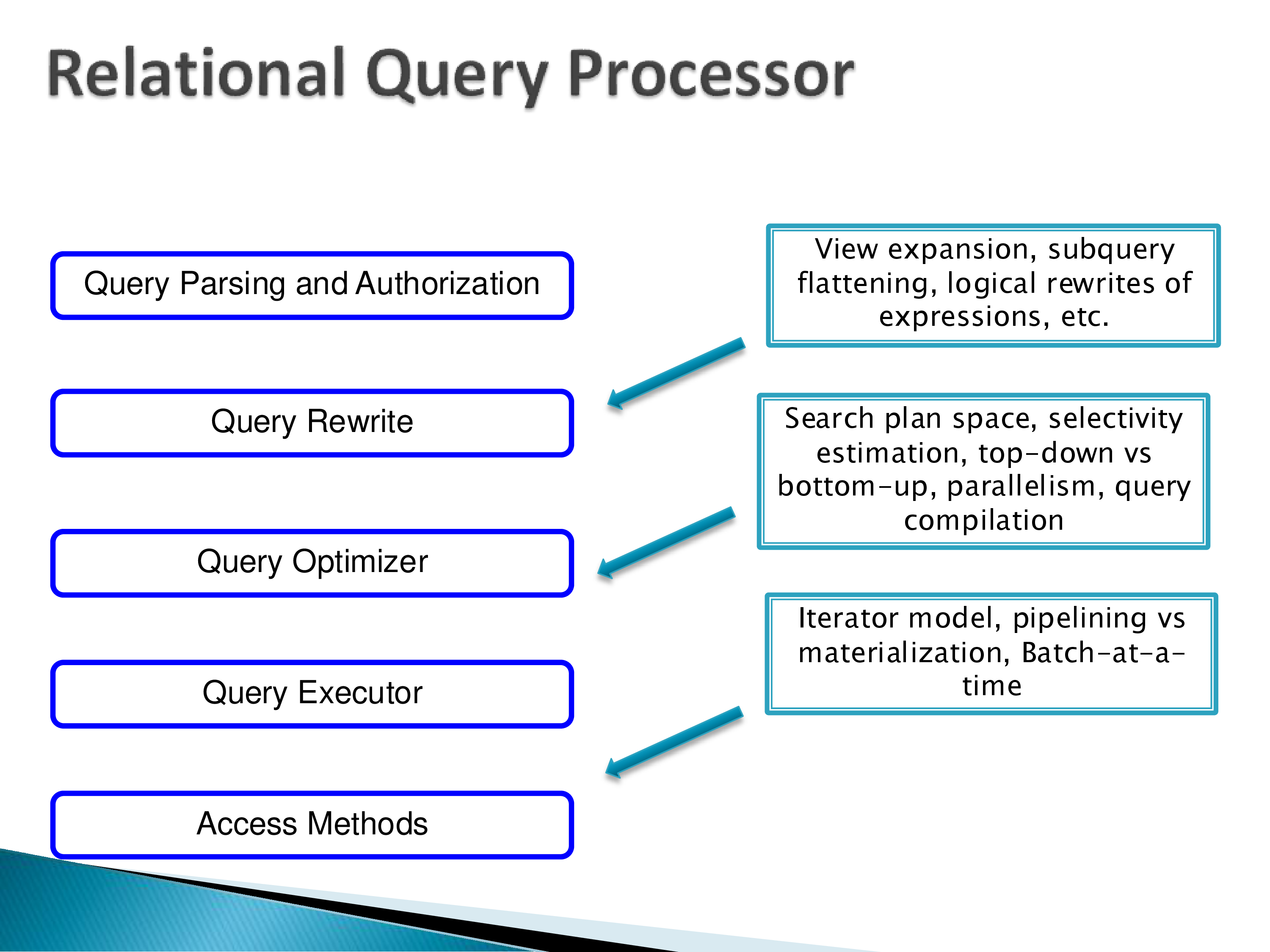
Zooming into the middle of the architecture diagram, the query processor has roughly five stages:
- Query parsing and authorization — parse the query and check that the user is allowed to run it.
- Query rewrite — view expansion, subquery flattening, logical rewrites of expressions. All kinds of transformations to make the query faster before an optimizer ever sees it.
- Query optimizer — searching the plan space, selectivity estimation, top-down versus bottom-up search, parallelism, query compilation.
- Query executor — the iterator model, pipelining versus materialization, batch-at-a-time processing.
- Access methods — actually getting the data.
We will spend several weeks on stages 2 through 5 later in the semester, so this is deliberately high-level here. The paper’s summary is a good orientation.
8. Data Warehouses
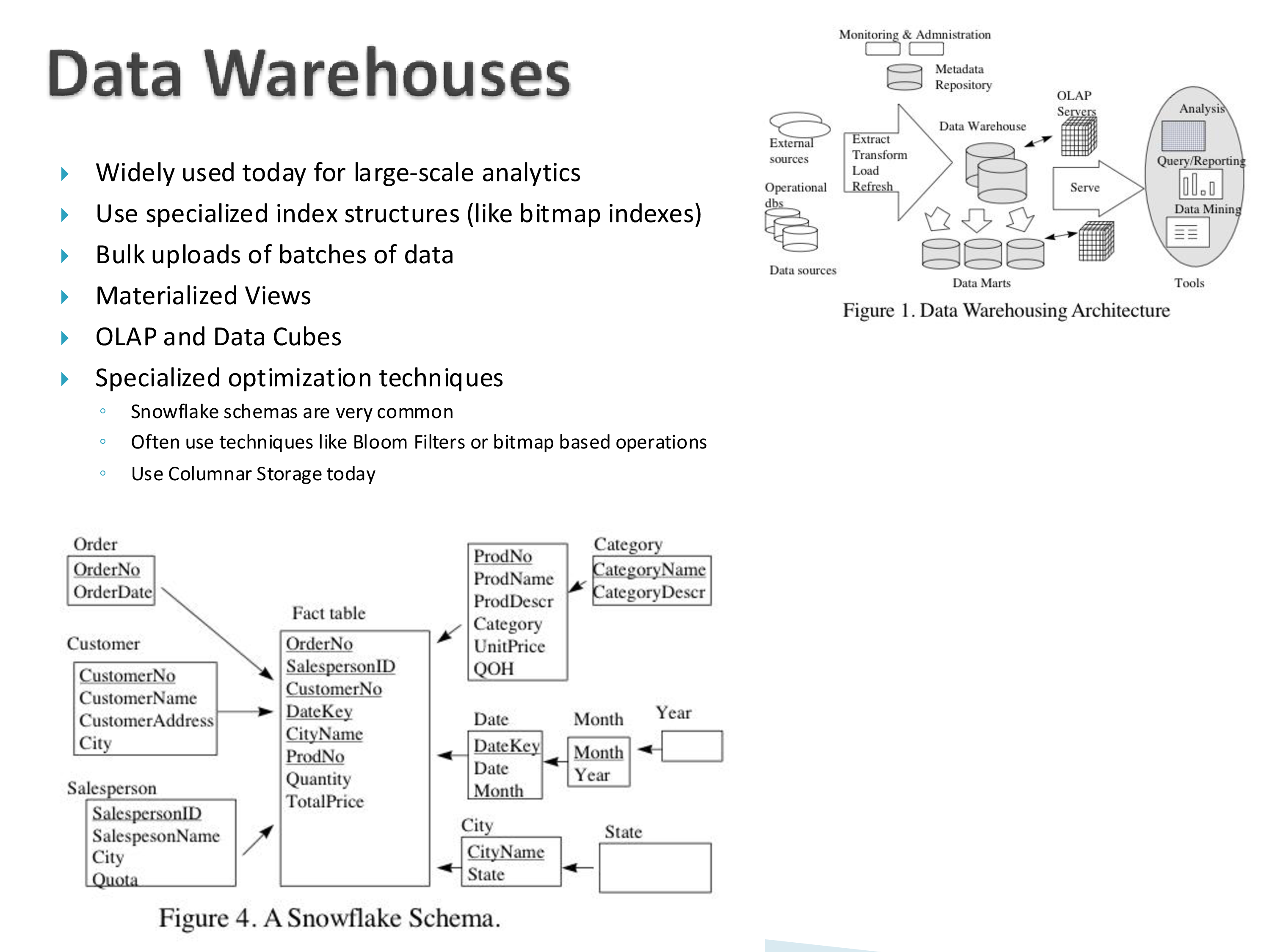
Data warehouses started appearing in the late 1990s and are now ubiquitous — essentially every organization has one. The original purpose was to collect data from all the operational systems into a primarily read-only system where business analytics could run on top. Today that extends to machine learning, data mining, and whatever else.
The architecture: operational data sources — think of a company like Walmart with a database in every store — feed into an ETL (extract, transform, load) phase, which produces the warehouse, on top of which sit specialized structures for analytics.
The ETL phase is very expensive, and the expense is in setup rather than runtime. Adding a new source to an ETL pipeline is typically a months-long process. The data is often noisy and must be cleaned. Entities must be resolved: external sources will not use the same identifiers as your operational systems, so you have to make everything consistent. Adding a source usually means changing the schema too — which is the data integration problem showing up again. There are still no really good solutions here, and we will not spend much time on ETL in this course, but in the analytics context it is a major step.
The warehouse itself is a big database system, most often parallel and distributed. On top, more specialized structures support analytical queries, because the underlying data is in the terabyte range and the queries are complex — you cannot simply run them.
The paper’s list of what distinguishes warehouse systems:
- Specialized index structures such as bitmap indexes.
- Bulk uploads of batches of data — you might load the previous day’s data each night.
- Materialized views and heavy use of precomputed results, because computing on demand is too expensive. To give an analyst a real-time interactive interface, you need a great deal of precomputation. This is exactly the niche Tableau specialized in.
- OLAP and data cubes — multi-dimensional aggregates that make analytical queries tractable.
- Specialized optimization techniques — snowflake schemas are very common, Bloom filters and bitmap operations are used heavily, and columnar storage is the norm today.
Star and snowflake schemas
Warehouse schemas have a characteristic shape. Dimension tables hold relatively static descriptive data — all the products, all the salespeople, all the customers. The fact table records events: which customer bought what from which salesperson, how much, at what total price. The fact table has one row per item sold, so it is enormous and the dimension tables are small.
Do Tableau and Power BI read from these cubes? Essentially they are the cubes — data cubes are internal data structures for them. Tableau builds its own cubes in memory and runs against those directly. Some database systems will build cubes for you, but these tools mostly take the raw data and build their own.
Does the fact table need a primary key? Sometimes it has one, sometimes not. Often the combination of dimension keys is treated as the key. In the TPC-H benchmark — which you will see referenced constantly — there is an explicit line item ID, though whether it is really used is unclear.
9. Storage Management
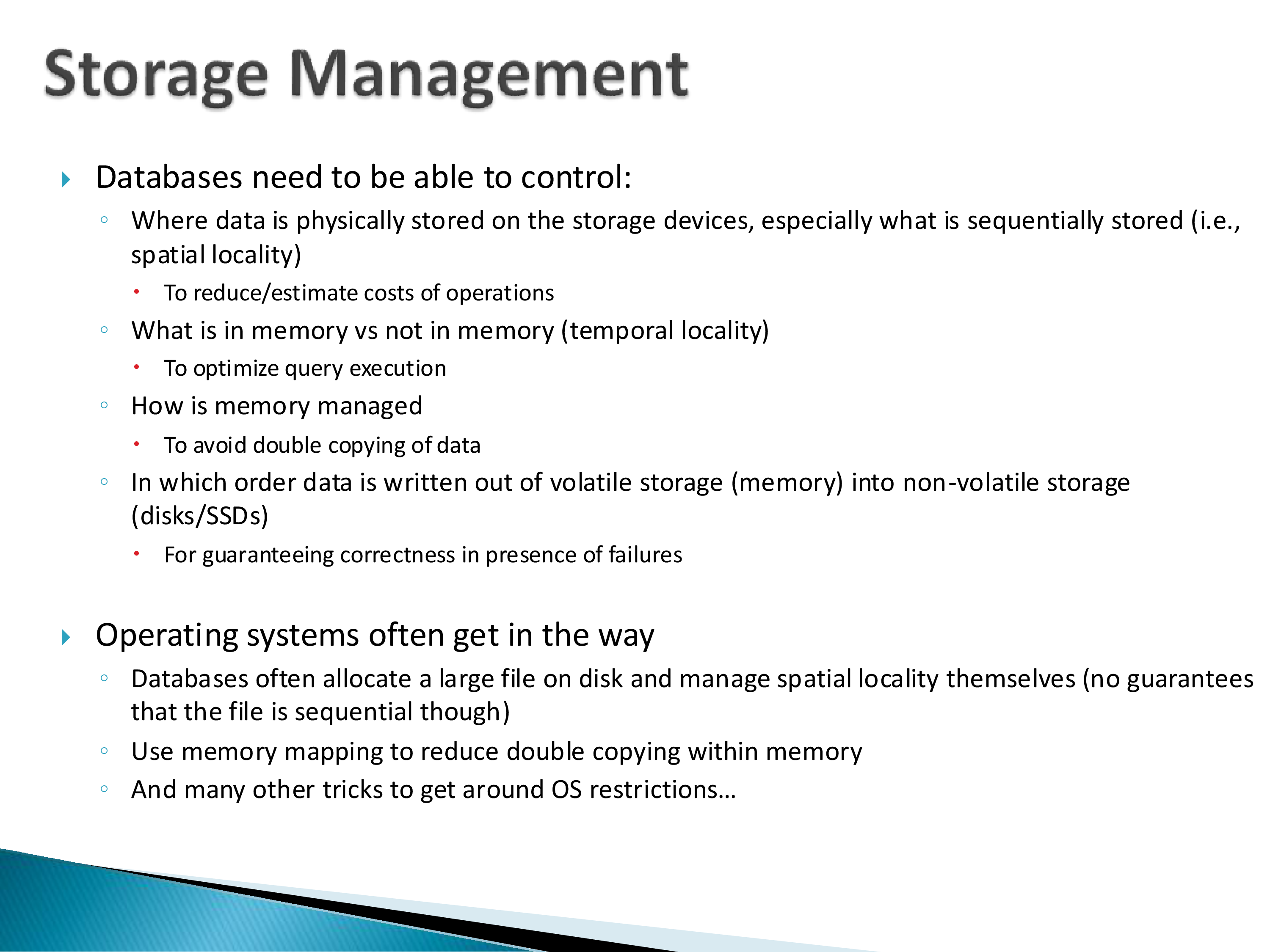
This returns to the problem we opened with. Databases need to control four things:
- Where data is physically stored — especially what is stored sequentially (spatial locality), both to reduce cost and to estimate it.
- What is in memory versus not (temporal locality), to optimize execution.
- How memory is managed, to avoid double-copying data.
- In which order data is written from memory to disk, for correctness under failure.
And, as the slide puts it plainly: operating systems often get in the way.
Sequential layout
Say you have a fact table and you want its tuples laid out sequentially on disk. Within a page, sequential layout is guaranteed. The problem is across pages: if the table needs a million pages, how do you ensure those are sequential?
The workaround systems actually use: allocate one large file and hope the operating system lays it out sequentially — with no guarantees. The OS might reasonably decide it has some free pages here and some there and split it up. From the OS’s point of view that is sensible. From the database’s point of view it is a bad outcome.
What PostgreSQL does is allocate a large file and then manage the pages within that file itself, bypassing the OS for the question of what is stored where. All the relations end up in one large file, growing as needed, with the initial size configurable when you create the database.
The honest summary: the database wants to control things at the physical level, but it can only see them at the logical level, because the file system controls the physical level.
What if records need to move? Usually they will not — there are all kinds of problems with moving things. There may be a periodic reorganization, but it is expensive, because there are pointers inside the file: indexes point at specific records, so moving records means fixing up everything that references them. Most databases avoid it.
The operating system problem, and how systems escaped it
Is there a workaround, or is this just a permanent problem?
Both, historically. Stonebraker wrote a paper complaining about exactly this — arguing that operating systems needed to provide certain things or database life would remain very difficult. It is not clear operating systems changed anything as a result, but it is instructive to go back and read.
The earliest high-performance database systems, working with very limited resources, simply bypassed the operating system. They built their own — very minimal operating systems, essentially file systems — took over their own disk, and ran on that. Oracle had its own small specialized OS.
At some point that stopped being feasible: you needed your database to run on Windows, on Unix, on SunOS. So they gave up and built on top. Operating systems have since added more of the needed features — but there is enormous lag, because these systems are so mature. Just because an OS starts supporting asynchronous I/O does not mean the database can use it next year; it might be a decade.
The paper in question is Michael Stonebraker, “Operating System Support for Database Management,” CACM 24(7), 1981. It is three pages, and it is worth reading precisely because the complaints are so specific: buffer pool management, file systems, scheduling, interprocess communication, and consistency control, each examined and each found to serve the database badly.
Its argument has a modern echo. Every few years someone proposes that the OS should expose lower-level control — io_uring, O_DIRECT, user-space NVMe drivers, kernel bypass — and each time some fraction of the database community adopts it. The systems that most aggressively pursue performance today are, in effect, doing what Oracle did in 1980: taking over the disk and going around the kernel. The difference is that the interfaces for doing so are now sanctioned rather than improvised.
Memory mapping and double copying
Consider reading a page from a file into memory. The database is a process with its own virtual memory, so trace what happens: the page is read into operating system memory, and then copied into the database’s memory. You now have two copies.
For a normal process that makes sense — normal processes read parts of files, not whole pages, and the OS cache is a genuine benefit. For a database system it is pure waste, and at scale it is a significant enough problem to matter.
Eventually operating systems added memory mapping, and the issue went away: the database can map a chunk of its virtual memory onto a region of disk, avoiding the double copy. The mechanism is subtle, and it is worth understanding one level deeper than this description.
10. Transactions
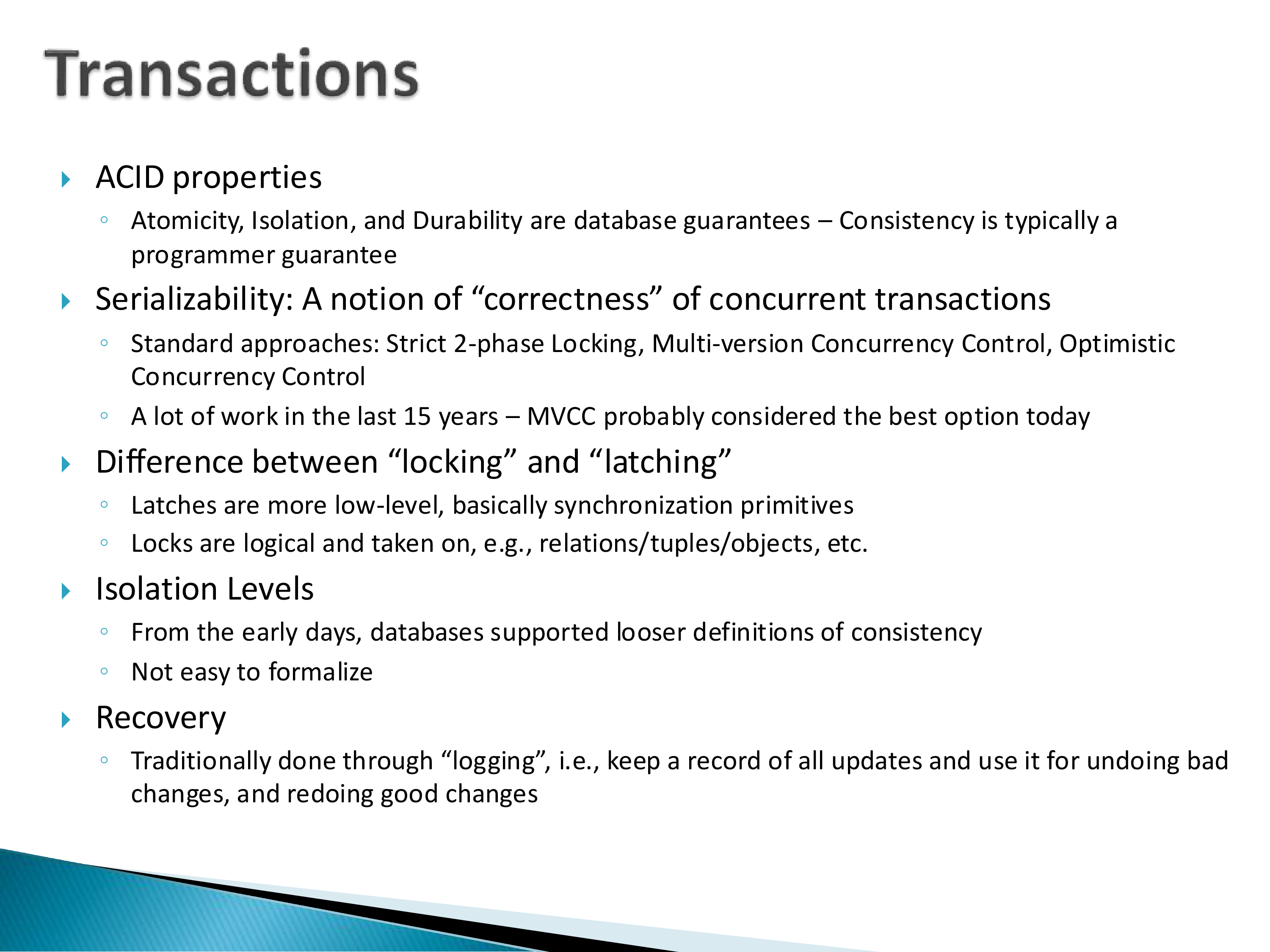
We will not spend much time on transactions in this course, but the vocabulary appears throughout the papers.
ACID properties. Atomicity, isolation, and durability are database guarantees; consistency is typically a programmer guarantee. Databases have provided these since the mid-1970s.
Serializability is the notion of correctness for concurrent transactions. The standard approaches are strict two-phase locking, multi-version concurrency control, and optimistic concurrency control. There has been a great deal of work in the last fifteen years, and MVCC is probably the best option today — if you are building a new database system, MVCC is what makes the most sense.
If you know distributed systems, note that linearizability is not the same as serializability, despite the similar names and similar intuitions. There are real and subtle differences between them, and conflating them will make several papers confusing.
Locking versus latching — as covered in Section 5.
Isolation levels. From the earliest days, databases supported looser definitions of consistency that are not, technically, ACID. These were proposed in the 1976 paper mentioned earlier, and there have been many attempts to formalize them since; they are not easy to formalize. Modern databases support them regardless.
Recovery is traditionally done through logging: keep a record of all updates, and use it to undo bad changes and redo good ones.
If you want to go one level deeper on any of this, there is a good survey by Mike Franklin (1997) — written, as it happens, for this course, when he was here. It is more of an introductory paper than a survey, and it is enough to follow what is going on. Obviously it predates thirty years of subsequent work.
11. Shared Components
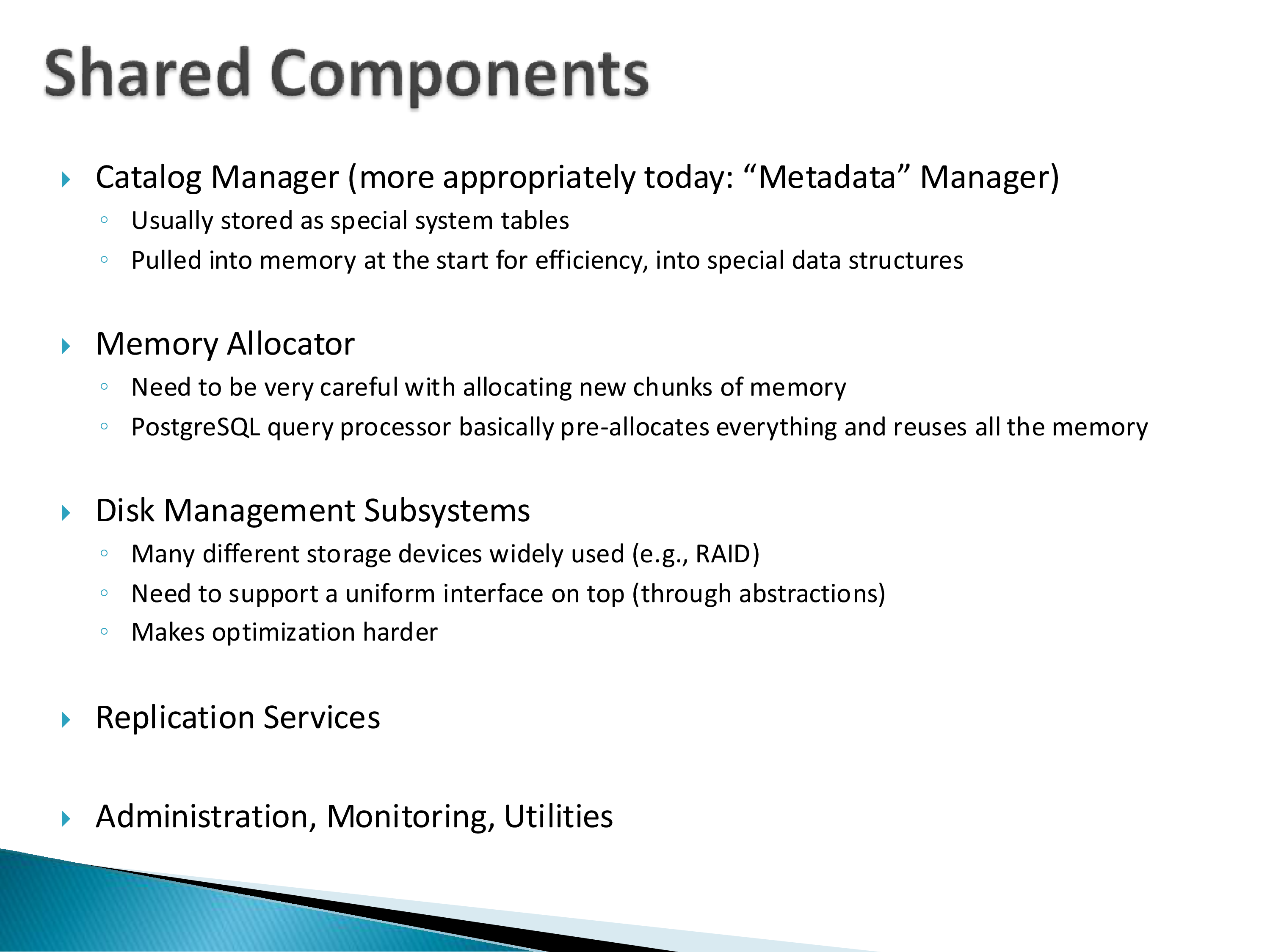
The assorted components a database needs in order to actually work.
Catalog manager — more appropriately called a metadata manager today. It tracks the tables and the schema of the database. Usually stored as special system tables, and pulled into memory at startup into specialized data structures for efficiency. We will run into it repeatedly when we discuss query processing.
Memory allocator. You have to be very careful about allocating new chunks of memory. The paper spends real time on this because PostgreSQL is interesting here: repeatedly calling malloc is expensive, since it requires a context switch. PostgreSQL gets around this by pre-allocating a large chunk of memory and reusing it — it has an entire memory allocator and management layer built into it. It is special-purpose, and it is built really nicely.
Disk management subsystems. Many different storage devices are in wide use — RAID among them — and the system needs a uniform interface on top, through abstractions. Those abstractions make optimization harder, which is the recurring tension of this whole chapter.
Replication services, and administration, monitoring, and utilities.
Does this architecture apply to multi-node systems? More or less, depending on how it is architected. A typical PostgreSQL multi-node deployment runs a copy of PostgreSQL on each machine, with a layer on top that coordinates between them — because PostgreSQL instances cannot talk to each other directly. Since the source is open, that layer may be built into the codebase rather than being a separate component.
Ideally some of these components would be centralized. You do not want multiple copies of the catalog manager, and admission control should happen above the distributed system rather than independently at each node. There are far too many variations of this in the distributed context to generalize.
12. What to Take Away
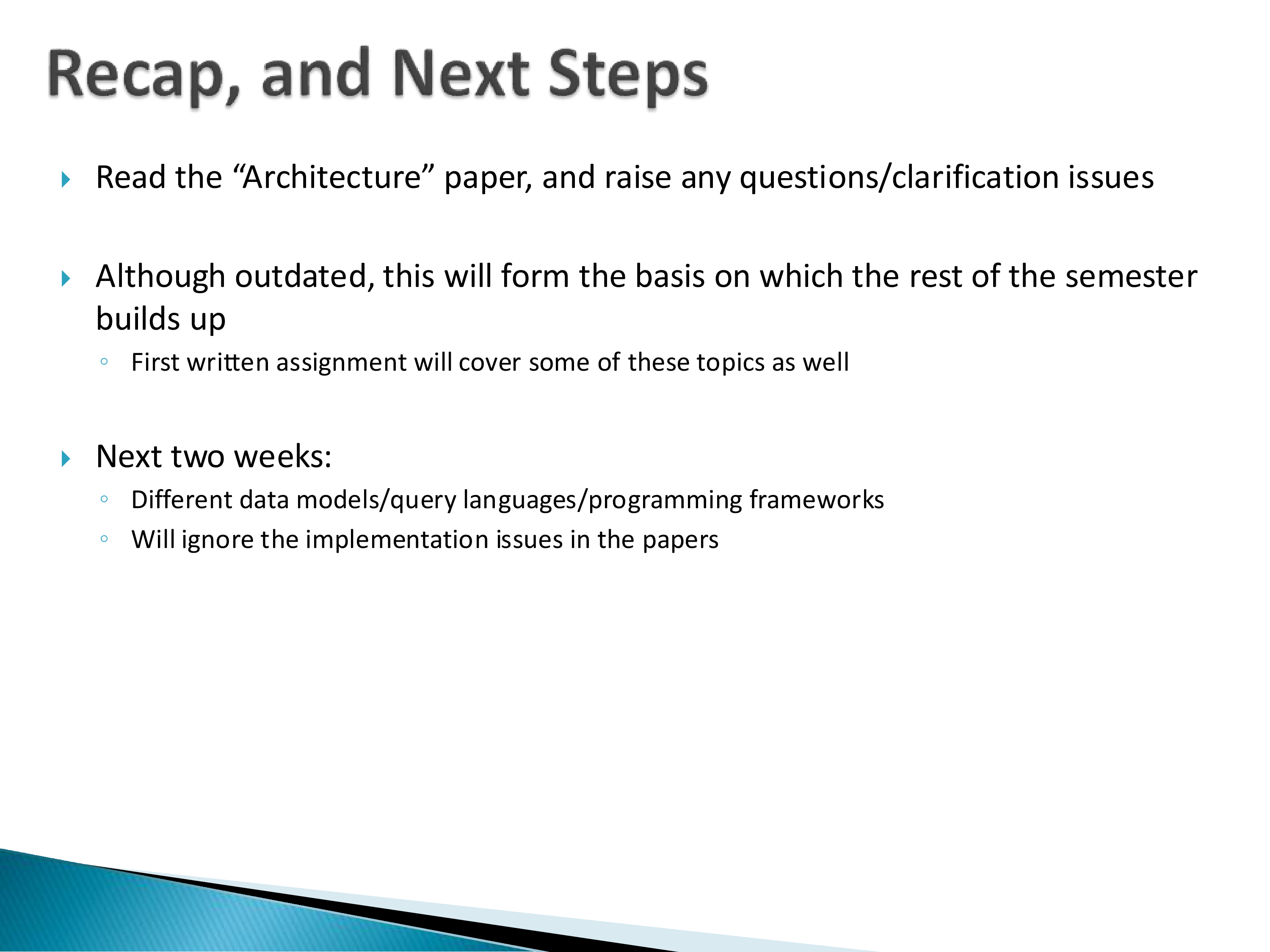
Read the paper, and bring questions. Although it is outdated in places, it forms the basis on which the rest of the semester builds — from here on we will almost always be discussing specific papers about specific components, and rarely the whole system again. This is the one place where we look at a database end to end.
The through-line worth carrying forward: a database system is, to a large degree, an argument with the operating system underneath it. Almost every design decision in this chapter — the process model, managing pages inside one big file, the custom memory allocator, memory mapping, the insistence on controlling write ordering — exists because the OS provides an abstraction that is right for general-purpose programs and wrong for a database.
That framing also predicts where the field went next, which is worth noting since so much of this course is about post-2007 systems.
If the friction comes from a general-purpose OS abstraction sitting between the database and the hardware, there are only a few possible responses, and the field has tried all of them. Bypass it — kernel bypass, O_DIRECT, user-space drivers. Absorb it — a single-node embedded engine like DuckDB or SQLite, where the boundary is a library call. Escape it — cloud-native systems where the storage layer is a network service with its own contract, and the local file system stops being the thing you argue with.
Which is one reason a 2007 paper describing “the” architecture cannot be rewritten today. The components are still recognizable, but where the boundary against the operating system is drawn now differs from system to system, and that boundary is exactly what the paper was describing.